Adventure Time: Card Wars PDF Creator
A small tool for creating printable PDF sheets of cards for the Adventure Time Card Wars game. Choose local card images or download a card set or deck from Card Dweeb, arrange the images at a chosen size on A4 pages, and print the result.
This is a fan-made printing utility. It is not affiliated with or endorsed by Adventure Time, Cryptozoic Entertainment, Frederator Studios, Cartoon Network, or Card Dweeb.
Features
- Create multi-page A4 PDFs from card images on your computer.
- Download all cards in a set from the Card Dweeb database.
- Load official and community decks from Card Dweeb and download their cards. Multiple copies of a card in a deck are saved as separate images.
- Choose standard card, hero card, field card, or custom dimensions.
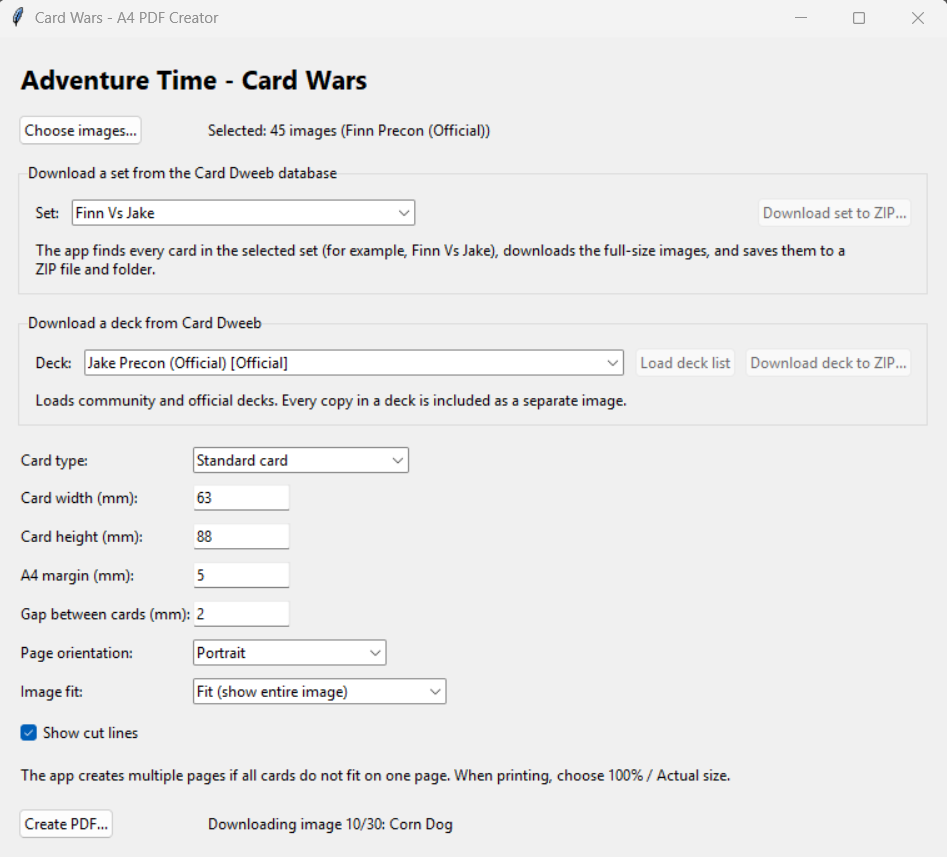
- Configure page orientation, margins, spacing, image fitting, and cut lines.
- Save downloaded images to both a ZIP archive and a folder.
Screenshot
Getting started
Run the source file
Install Python 3.12 or later.
Install the dependencies:
python -m pip install reportlab pillowRun the app:
python card_wars_pdf.py
Using the app
Create a PDF from local images
- Select Choose images... and choose the card image files to print.
- Select a card type preset, or enter a custom width and height in millimeters.
- Set the A4 margin and the gap between cards.
- Choose portrait or landscape orientation, then select how images should fit:
- Fit (show entire image) keeps the whole image visible without distortion.
- Fill (crop edges) fills the card area and crops any excess at the edges.
- Enable or disable Show cut lines as desired.
- Select Create PDF... and choose where to save the PDF.
The app creates as many pages as needed. When printing, choose 100% or Actual size rather than scaling the PDF to fit the paper.
Download a card set
- In Download a set from the Card Dweeb database, select or enter a set.
- Select Download set to ZIP... and choose where to save the archive.
- The app saves the downloaded images to a folder next to the ZIP and loads them into the PDF creator.
Download a deck
- In Download a deck from Card Dweeb, select Load deck list.
- Choose a deck from the list. Official and community decks are labeled.
- Select Download deck to ZIP... and choose where to save the archive.
- The app saves the deck images to a folder next to the ZIP and loads them into the PDF creator. Each card copy in the deck is included separately.
Internet access is required to load deck lists and download sets, decks, and card images. The available decks and cards depend on Card Dweeb.
Card dimensions and print accuracy
The included dimensions are starting points and are not guaranteed to match official card dimensions. Measure your own cards and adjust the width and height if accurate sizing is important. Printer settings and printer hardware can also affect the final size.
Building the Windows executable
Install the app dependencies and PyInstaller:
python -m pip install reportlab pillow pyinstaller
Build using the included spec file:
python -m PyInstaller --noconfirm CardWarsPDF.spec
The executable is written to dist/CardWarsPDF.exe.
Credits and card content
Card images, names, and game content belong to their respective copyright holders. Card data and images are retrieved from Card Dweeb and the CardWarsData repository. Please review Card Dweeb's developer resources and the relevant source repositories before using or redistributing their content.
License
The source code for this project is licensed under the MIT License. See LICENSE for the full text.